GPT Image 2 for Product Photos and Packaging Mockups
Use GPT Image 2 when product visuals need realistic lighting, readable labels, and controlled edits from a real source photo.
Product imagery is where GPT Image 2 starts to feel less like a creative toy and more like production infrastructure.
The reason is simple: product images have constraints. The bottle needs to stay the same shape. The label cannot mutate. The headline on the packaging has to be readable. The background can change, but the product itself cannot drift into a different SKU.
Older image models could make a beautiful product-looking image. GPT Image 2 is better at the harder job: preserving details while improving the commercial presentation.
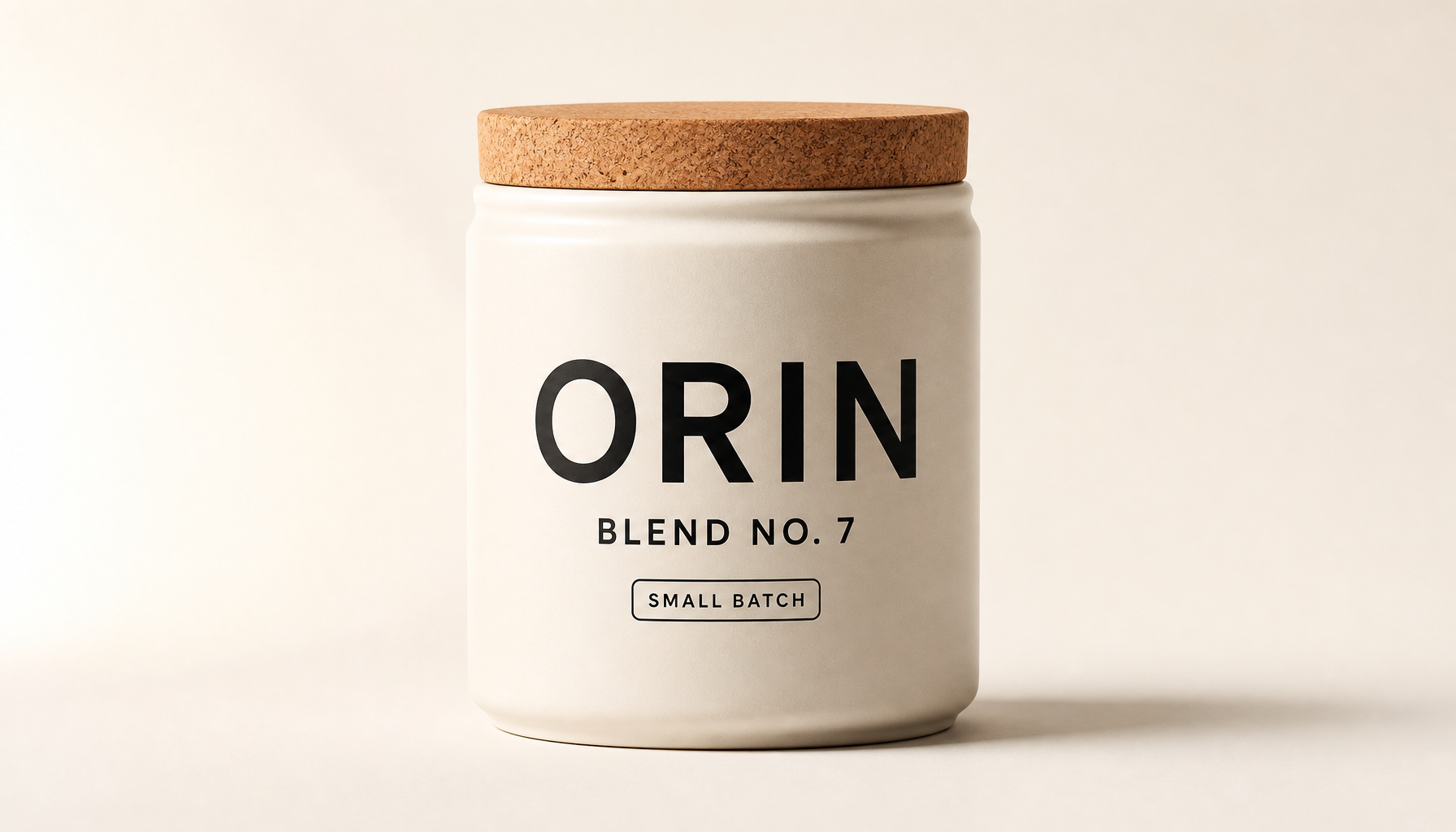
Generated in ImageLayer with General mode, GPT Image 2, X / Twitter (16:9), and the exact prompt below.
The exact run behind this image
To reproduce the ORIN canister result above, use:
- Mode: Image
- Content type: General
- Platform preset: X / Twitter (16:9)
- Model: GPT Image 2
- Apply brand guidelines: Off
Paste this prompt:
Studio product photo of a soft ivory ceramic coffee canister with cork lid, front-facing on warm off-white seamless background. Label text exactly: "ORIN" large black sans-serif, "BLEND NO. 7" below, small badge "SMALL BATCH". Softbox light from camera-left, gentle fill right, soft contact shadow, crisp printed label, premium e-commerce look. X/Twitter 16:9 crop. No extra props, no extra words, no fake logos, no watermark.The best use cases
Use GPT Image 2 for product work when you need one of these outcomes:
- a clean product-on-white shot from a rough phone photo
- a lifestyle scene that keeps the same product geometry
- a packaging mockup with readable brand and product text
- variant concepts for seasonal launches or limited editions
- PDP, email, and ad visuals from the same source image
- background cleanup without changing the product
- pitch deck mockups before a real packaging shoot
If the image is just a loose lifestyle concept, a faster image model may be enough. If the image contains product identity, label text, or a customer-uploaded reference, GPT Image 2 is the safer choice.
Start with the Product Photo template
ImageLayer already has a Product Photo content type. That should remain the default path for most e-commerce customers because it turns a hard prompt into a few fields:
- Product Name
- Description
- Photo Style
- Background
- Additional notes
For GPT Image 2, the notes field is where the customer should add preservation and text rules.
Example:
Preserve the product geometry from the reference photo. Keep the cap, label placement, bottle proportions, and all visible packaging text unchanged. Use a soft off-white studio background with a subtle contact shadow. Do not invent claims or add extra text.That is more useful than “make it premium.” It says what can change and what must not.
Copy-paste prompt: clean e-commerce product shot
Use the exact ORIN prompt above when you want to reproduce the shown result. Use this shorter template when you want to swap in your own product while staying inside the dashboard prompt limit:
[PRODUCT] front-facing on a warm off-white seamless studio background. Label text exactly: "[BRAND]" large clean sans-serif, "[PRODUCT LINE]" below, small badge "[BADGE]". Softbox light from camera-left, gentle fill right, soft contact shadow, crisp printed label, premium e-commerce look. X/Twitter 16:9 crop. No extra props, no extra words, no fake logos, no watermark.Copy-paste prompt: packaging concept
Use this when the customer is testing a new SKU or product line before committing to real design work.
Scene:
A premium studio packaging mockup photographed straight-on against a clean neutral backdrop.

Subject:
A [PRODUCT TYPE] package for a brand called "[BRAND]".

Important details:
Packaging material: [MATERIAL].
Surface texture: [TEXTURE].
Main logo reads "[BRAND]" in [LOGO STYLE].
Product line reads "[PRODUCT LINE]".
Small badge reads "[BADGE TEXT]".
The package uses [COLOR PALETTE] and a restrained modern layout with generous margins. Soft studio lighting, crisp edges, realistic print texture, and subtle surface reflection.

Use case:
Packaging concept for stakeholder review, product launch planning, and ad testing.

Constraints:
Render all quoted text exactly. No extra ingredients, claims, icons, seals, or legal text. No third-party logos. No watermark.
Copy-paste prompt: lifestyle product ad
Use this when the product needs to feel used, not just displayed.
Scene:
A real-life [SETTING] during [TIME OF DAY], photographed like a premium editorial campaign.

Subject:
[PRODUCT] being used naturally by [PERSON / HAND / CONTEXT].

Important details:
The product remains the hero, occupying about 45 percent of the frame. Natural grip, believable scale, realistic contact shadows, and visible material texture. Lighting is [LIGHTING STYLE]. Background is softly detailed but not distracting. Leave calm negative space for optional overlay copy.

Use case:
Lifestyle ad creative for Instagram, Facebook, or a landing page hero.

Constraints:
Do not change the product design. No extra logos. No fake UI unless specified. No unreadable text. No watermark.
Editing beats regenerating
The biggest mistake in product workflows is asking the model to recreate the whole image when only one part needs to change.
Use edit prompts when the product identity matters:
Change:
Replace the background with a clean pale stone surface and soft studio backdrop.

Preserve:
Keep the product, label, logo, cap, proportions, camera angle, crop, and main shadow direction exactly the same.

Constraints:
Do not redesign the packaging. Do not alter any text. Do not add props. No watermark.
This is the pattern your customers should learn: change one thing, preserve everything important, repeat the preserve list on every revision.
Product photo checklist
Before generating, ask:
- Does the product text need to be readable?
- Does the product shape need to match a real SKU?
- Is there a reference photo that should anchor the output?
- Is the image for a product page, ad, email, or marketplace listing?
- Should there be negative space for copy or a CTA?
- What must not change?
Those answers belong in the prompt. GPT Image 2 is strong, but it still needs the production constraints.
Where this fits in ImageLayer
Use Product Photo for repeatable catalog work.
Use General for packaging concepts, novelty campaign visuals, or one-off art direction.
Use References whenever the real product matters.
Use Platform Presets to generate different crops for PDPs, Instagram, Pinterest, email banners, and ads without manually redesigning the image.
For stores, agencies, and marketplaces, that combination is the point. The product team does not need to learn prompt engineering. They need a workflow that preserves the SKU and improves the shot.
Keep exploring
- E-commerce Photography Without the Studio - The Product Photo template workflow.
- GPT Image 2 Playbook - The broader model strategy and prompt framework.
- Content Type Templates - How to turn this into repeatable fields.