Copy-Paste GPT Image 2 Prompts for Social Ads and Posters
GPT Image 2 makes text-in-image creative more reliable. Use these prompt patterns for paid social, launch cards, event posters, thumbnails, and trend-inspired brand assets.
The old rule for AI image generation was: generate the background, then add text somewhere else.
GPT Image 2 changes that for a lot of everyday marketing assets. It can render short headlines, badges, event details, UI copy, and poster text with enough reliability that the image itself can carry the message.
That matters because social creative is usually a text problem disguised as a design problem. The offer has to be readable. The event date has to be right. The launch headline cannot be misspelled. The thumbnail has to work at phone size.
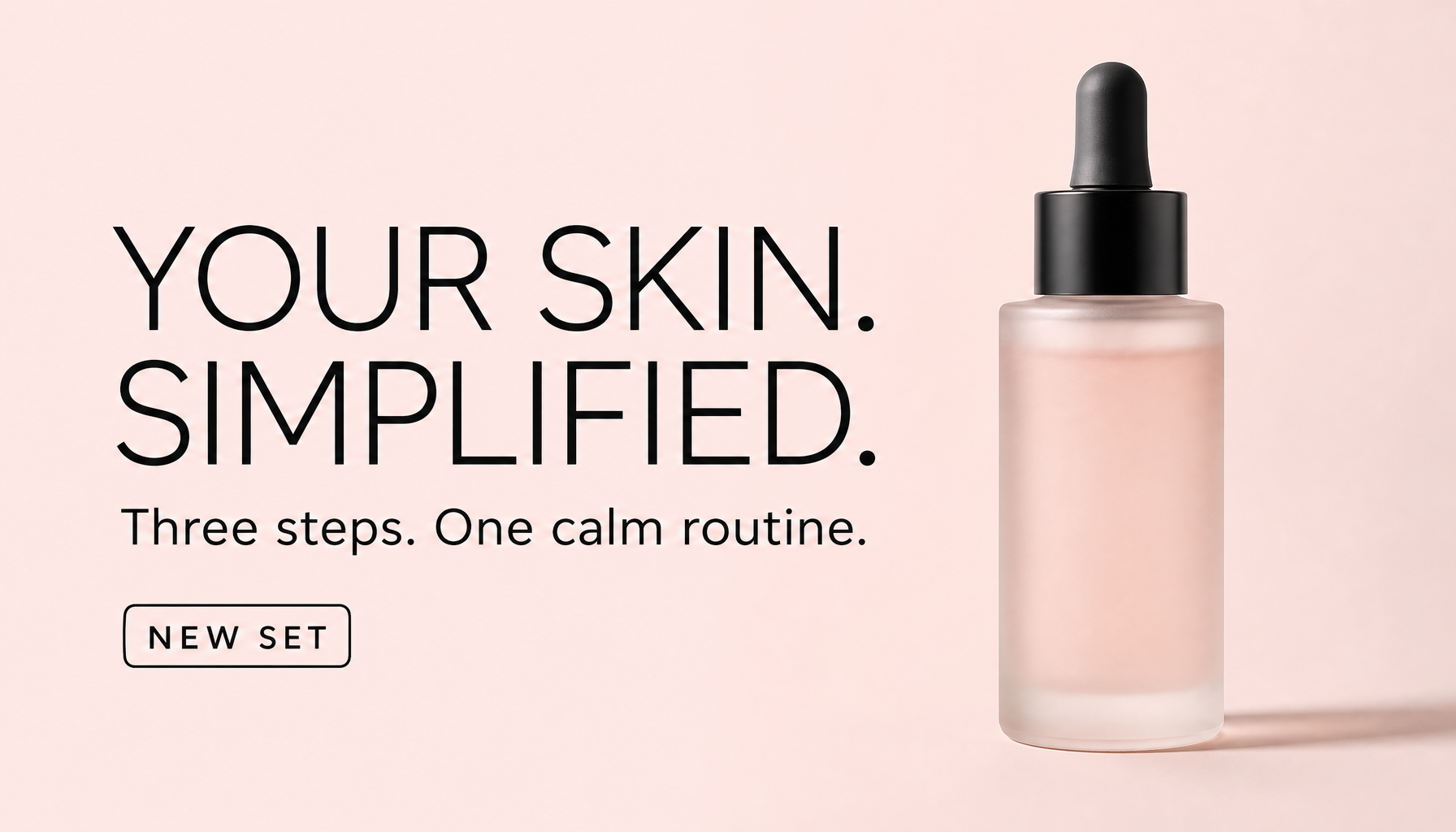
Generated in ImageLayer with General mode, GPT Image 2, X / Twitter (16:9), and the exact prompt below.
The exact run behind this image
To reproduce the skincare ad above, use:
- Mode: Image
- Content type: General
- Platform preset: X / Twitter (16:9)
- Model: GPT Image 2
- Apply brand guidelines: Off
Paste this prompt:
Typography-first paid social ad for a modern skincare brand. 16:9 X/Twitter feed image, pale blush background, one frosted glass serum bottle on the right. Large headline on left reads exactly "YOUR SKIN. SIMPLIFIED." Supporting line reads exactly "Three steps. One calm routine." Small badge reads exactly "NEW SET". Thin black sans-serif type, clean kerning, soft studio light, premium editorial style. No extra words, no fake logos, no watermark.The text-in-image rule
Treat every word in the image like layout, not like decoration.
Weak:
Make a nice launch poster for our new feature with some modern text.Better:
Headline text (EXACT TEXT, one line):
"Introducing Deal Replay"

Supporting text (EXACT TEXT):
"Post-call review for faster coaching"

Typography:
Bold geometric sans-serif headline, white, centered in the upper third. Supporting text at one-third the size directly below.

Constraints:
Render the quoted text verbatim. No extra words. No duplicate text. No misspellings.
The difference is not verbosity. The difference is instruction quality.
Prompt 1: paid social offer
Use the exact skincare prompt above when you want to reproduce the shown result. Use this template when you want to swap the product, copy, and offer:
[STYLE] paid social ad, 16:9. [BACKGROUND]. [PRODUCT] on the right. Large headline on left reads exactly "[HEADLINE]". Supporting line reads exactly "[SUPPORT]". Small badge reads exactly "[BADGE]". Clean sans-serif type, soft studio light, premium editorial style. No extra words, no fake logos, no watermark.Example field values:
HEADLINE: "25% OFF WEEKEND"
SUPPORTING LINE: "Use code SWEET25"
URGENCY: "Ends Sunday"
CTA: "Shop the drop"
Prompt 2: launch announcement poster
Use this for product launches, funding announcements, milestones, and feature drops.
Here is a real B2B version generated for the fictional PostPilot platform:
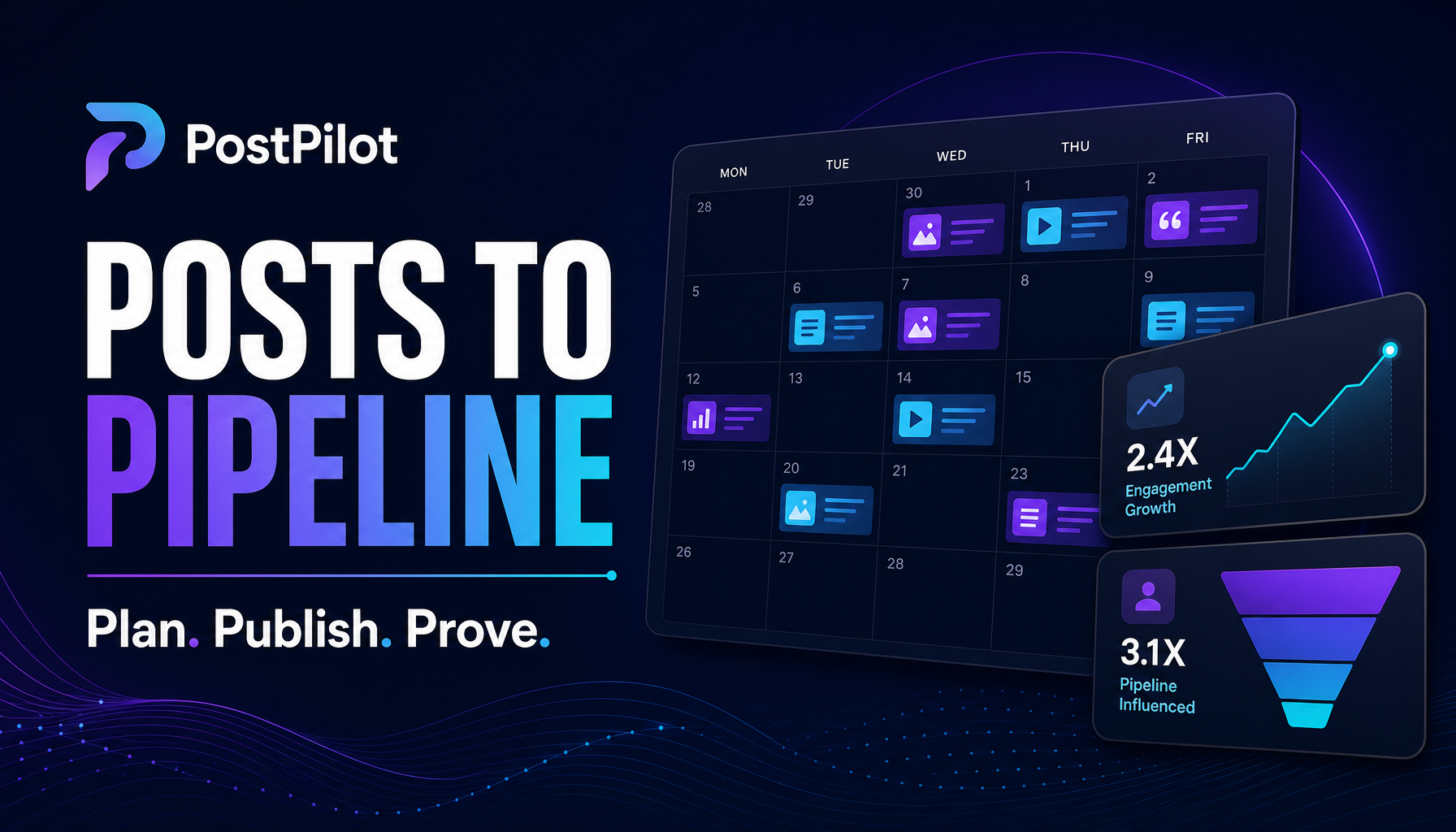
Generated in ImageLayer with General mode, GPT Image 2, X / Twitter (16:9), brand guidelines off.
Premium LinkedIn campaign graphic for fictional B2B social platform PostPilot. 16:9 dark navy canvas with violet and cyan accents. Large headline reads exactly "POSTS TO PIPELINE". Supporting line reads exactly "Plan. Publish. Prove." Show a clean content calendar and analytics cards, modern SaaS editorial design, no third-party logos, no real LinkedIn logo, no extra words, no watermark.Scene:
A vertical 4:5 launch announcement poster for LinkedIn.
Subject:
A premium product launch card for [COMPANY] announcing [ANNOUNCEMENT].
Important details:
Main headline reads "[HEADLINE]" in oversized geometric sans-serif type, centered slightly above optical center.
Supporting line reads "[DETAILS]" beneath at one-quarter the size.
Small label in the lower-left reads "[LABEL]".
Background uses [COLOR PALETTE] with one subtle abstract shape or grid texture. The design should feel like a restrained SaaS launch graphic, not a party flyer.
Use case:
LinkedIn launch post and press-ready social image.
Constraints:
Render all quoted text exactly. No confetti clutter. No third-party logos. No misspellings. No extra captions. No watermark.Prompt 3: typography event poster
Use this for webinars, workshops, pop-ups, launches, and community events.
Scene:
A bold contemporary event poster in vertical 2:3 format.

Subject:
An event poster for "[EVENT NAME]".

Important details:
Main title reads "[EVENT NAME]" in large high-contrast type, upper center.
Date line reads "[DATE AND TIME]" directly below.
Location line reads "[LOCATION]" near the bottom.
Visual motif: [MOTIF].
Color palette: [COLORS].
Typography: [TYPE DIRECTION].
Composition: clear hierarchy, generous margins, no clutter, one strong focal area.

Use case:
Event cover image for social, email, and registration pages.

Constraints:
Render quoted text verbatim. No extra sponsors. No fake QR code. No unreadable fine print. No watermark.
Prompt 4: YouTube or blog thumbnail
Use this when the image needs one short high-contrast line.
Scene:
A 16:9 thumbnail designed to stand out in a grid.

Subject:
[PERSON / PRODUCT / CONCEPT] as the hero visual on the right side.

Important details:
Large headline on the left reads "[HEADLINE]" in 3 to 6 words. Use thick sans-serif type, high contrast, and a strong outline or shadow only if it improves readability. Background uses [COLOR / MOOD]. The hero subject has a clear expression or silhouette.

Use case:
YouTube thumbnail, blog header, or social link preview.

Constraints:
Headline text must be exactly as quoted. No extra words. No tiny captions. No watermark. Must be readable at small size.
Prompt 5: brand-safe action figure trend
The blister-pack trend went viral because it gives the model a concrete product shape: figure, packaging, header, accessories, compartments.
For a company, use it as a playful campaign asset, not a default brand system.
Scene:
A straight-on studio product photo of a premium action figure blister pack.

Subject:
A stylized action figure of [PERSONA OR ROLE] sealed inside clear plastic packaging.

Important details:
Cardboard backing header reads "[NAME]" in oversized sans-serif type.
Small tagline reads "[TAGLINE]".
Accessories in molded compartments: [ACCESSORY 1], [ACCESSORY 2], [ACCESSORY 3].
Packaging colors follow [BRAND COLORS]. Soft top lighting, clean off-white background, subtle floor reflection.

Use case:
Playful LinkedIn post, community spotlight, event giveaway concept, or internal launch celebration.

Constraints:
Render quoted text exactly. No real toy brand references. No third-party logos. No extra accessories. No watermark.
Prompt 6: retro trading card
Use this for customer heroes, employee spotlights, partner announcements, or community badges.
Scene:
A premium retro trading card in vertical 3:4 format.

Subject:
[PERSONA / CUSTOMER / PRODUCT] as the central character or object.

Important details:
Top banner reads "[CATEGORY]".
Name plate reads "[NAME]".
Three stat badges read "[STAT 1]", "[STAT 2]", and "[STAT 3]".
Border style: [BORDER STYLE].
Background: [BACKGROUND].
Finish: subtle holographic foil, printed card texture, sharp studio lighting.

Use case:
LinkedIn carousel slide, customer spotlight, team recognition, or campaign collectible.

Constraints:
Render all quoted text exactly. No extra stats. No fake licensed marks. No watermark.
How to use these inside ImageLayer
Start with General mode for trend-inspired creative because the format is usually too specific for a standard template.
Move into Content Type Templates when the asset repeats every week. A paid social offer, event poster, announcement card, and thumbnail all benefit from fields because the user should only need to provide the message, not rewrite the typography rules.
Pair the workflow with the right Platform Preset:
- LinkedIn Post for launch cards and B2B campaign graphics
- Instagram Post for offer graphics and brand moments
- Instagram Story for vertical promotions
- YouTube Thumbnail for large type and high contrast
- Email Banner for simple campaign headers
The mistake to avoid
Do not cram the entire campaign brief into one paragraph.
GPT Image 2 follows structure well. Give it sections. Quote the exact text. Tell it where the text sits. Say what not to add. Keep every revision to one change.
That is how a trend becomes a reusable customer workflow.
Keep exploring
- GPT Image 2 Playbook - The broader prompt framework.
- Run Promotions That Actually Get Noticed - The existing ImageLayer offer workflow.
- The Announcement Preset for Company News - Launch and milestone visuals.
- Content Type Templates - How to operationalize these prompts as fields.