Brand-Ready GPT Image 2 Prompts for Ads, Product Cards, and Campaign Kits
Copy-paste English GPT Image 2 prompts for branded advertising posters, marketplace product cards, brand kits, social carousels, travel posters, and campaign systems.
Most AI image prompts make one nice picture.
Brand work needs more than that. A usable campaign image has layout, palette, product placement, typography, logo rules, copy hierarchy, and enough restraint that the asset still feels like it belongs to one company.
That is where GPT Image 2 gets interesting inside ImageLayer. The model is strong at readable text and structured composition, so you can ask for assets that look closer to finished campaign creative: advertising posters, marketplace product cards, brand boards, carousel systems, packaging mockups, and launch visuals.
The trick is to write prompts like a creative brief, not like a mood board.
Example 1: Branded Advertising Poster
This is the strongest pattern to borrow from current creator prompt trends: split the poster into a small number of deliberate zones, then give every zone a job.
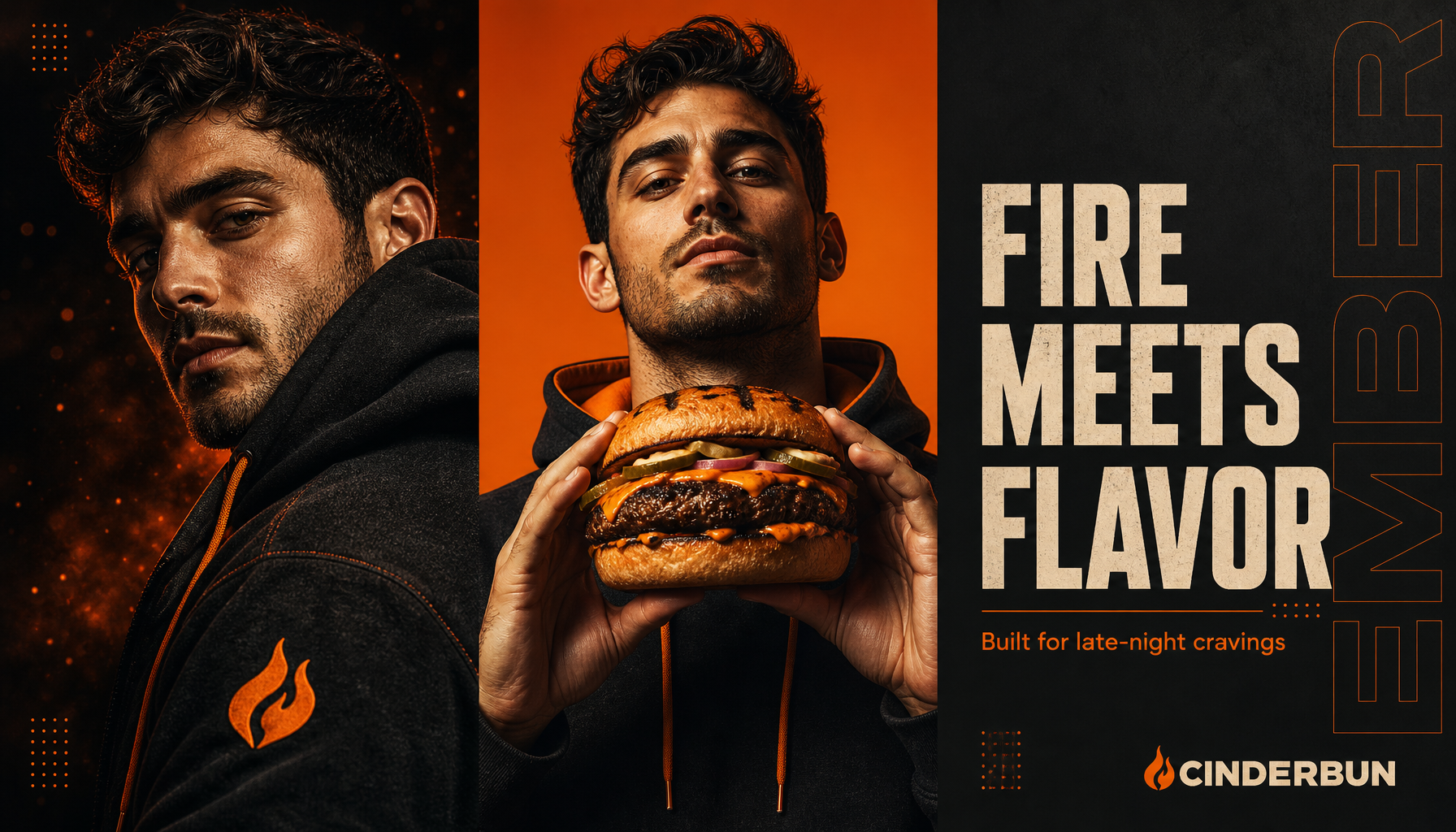
Generated in ImageLayer with General mode, GPT Image 2, X / Twitter (16:9), brand guidelines off.
Use this exact prompt to reproduce the structure:
16:9 professional advertising poster for fictional burger brand CINDERBUN, split into three vertical panels. Left: close-up portrait in charcoal hoodie with ember-orange accents, dramatic studio lighting. Center: hero subject holding a flame-grilled burger, clean ember-orange background, cinematic food photography. Right: solid charcoal background with headline exactly "FIRE MEETS FLAVOR", slogan exactly "Built for late-night cravings", small CINDERBUN wordmark bottom-right, subtle vertical "EMBER" text along right edge. Two-color palette: ember orange and charcoal, cream typography, dotted grid accents, premium editorial ad, photorealistic, Ultra HD. No real logos, no extra words, no watermark.Why it works: it does not ask for “a cool brand poster.” It tells GPT Image 2 where the person goes, where the product goes, where the headline goes, what colors to use, and what not to invent.
Reusable template:
[ASPECT RATIO] professional advertising poster for fictional [BRAND CATEGORY] brand [BRAND NAME], split into three [PANEL DIRECTION] panels. Left panel: [PORTRAIT OR LIFESTYLE SUBJECT] wearing [BRAND COLOR / WARDROBE], [LIGHTING]. Center panel: [PRODUCT HERO] with [HAND / PERSON / CONTEXT] clearly interacting with it, clean [PRIMARY COLOR] background. Right panel: solid [SECONDARY COLOR] background with headline exactly "[HEADLINE]", slogan exactly "[SLOGAN]", small [BRAND NAME] wordmark in the bottom-right corner, subtle repeated "[DESIGN PHRASE]" text along the edge. Palette only: [COLOR 1], [COLOR 2], and [TEXT COLOR]. Add [DECORATIVE SYSTEM]. Premium editorial advertising, photorealistic, Ultra HD. No real logos, no extra words, no watermark.Example 2: Marketplace Product Card
Product-card prompts are useful because they combine product photography, conversion copy, feature badges, and campaign layout in one asset.
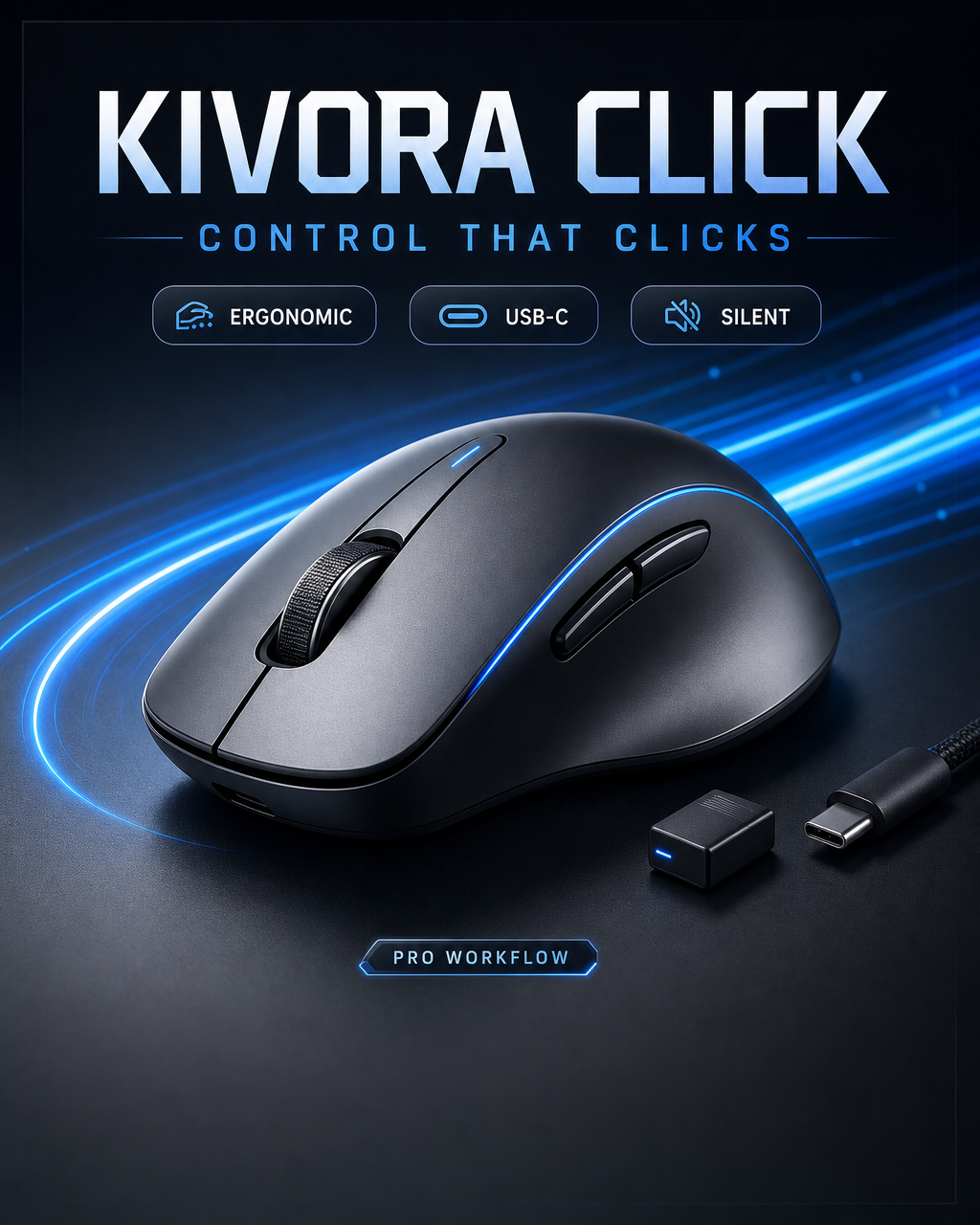
Generated in ImageLayer with General mode, GPT Image 2, LinkedIn Post (4:5), brand guidelines off.
Premium 4:5 marketplace product card for fictional wireless mouse KIVORA CLICK. Hero product centered on dark graphite desk surface with precise blue motion trails and hard studio shadow. Large headline exactly "KIVORA CLICK". Subheadline exactly "CONTROL THAT CLICKS". Three feature chips exactly "ERGONOMIC", "USB-C", "SILENT". Small badge exactly "PRO WORKFLOW". Include a tiny USB-C dongle and cable near the product. Futuristic e-commerce design, premium tech lighting, electric blue and graphite palette, sharp typography, high-end product ad. No real logos, no extra words, no watermark.Reusable template:
Premium [ASPECT RATIO] marketplace product card for fictional [PRODUCT CATEGORY] called [PRODUCT NAME]. Hero product [PLACEMENT] on [SURFACE / BACKGROUND] with [MOTION OR LIGHT EFFECT] and [SHADOW STYLE]. Large headline exactly "[PRODUCT NAME]". Subheadline exactly "[VALUE PROP]". Three feature chips exactly "[FEATURE 1]", "[FEATURE 2]", "[FEATURE 3]". Small badge exactly "[BADGE]". Include [ACCESSORY OR CONTEXT DETAIL]. [STYLE DIRECTION], [PALETTE], sharp typography, high-end e-commerce ad. No real logos, no extra words, no watermark.Example 3: Brand Kit Preview Board
A brand kit board is not a replacement for a designer, but it is a strong way to visualize a brand direction before turning it into a repeatable ImageLayer template.
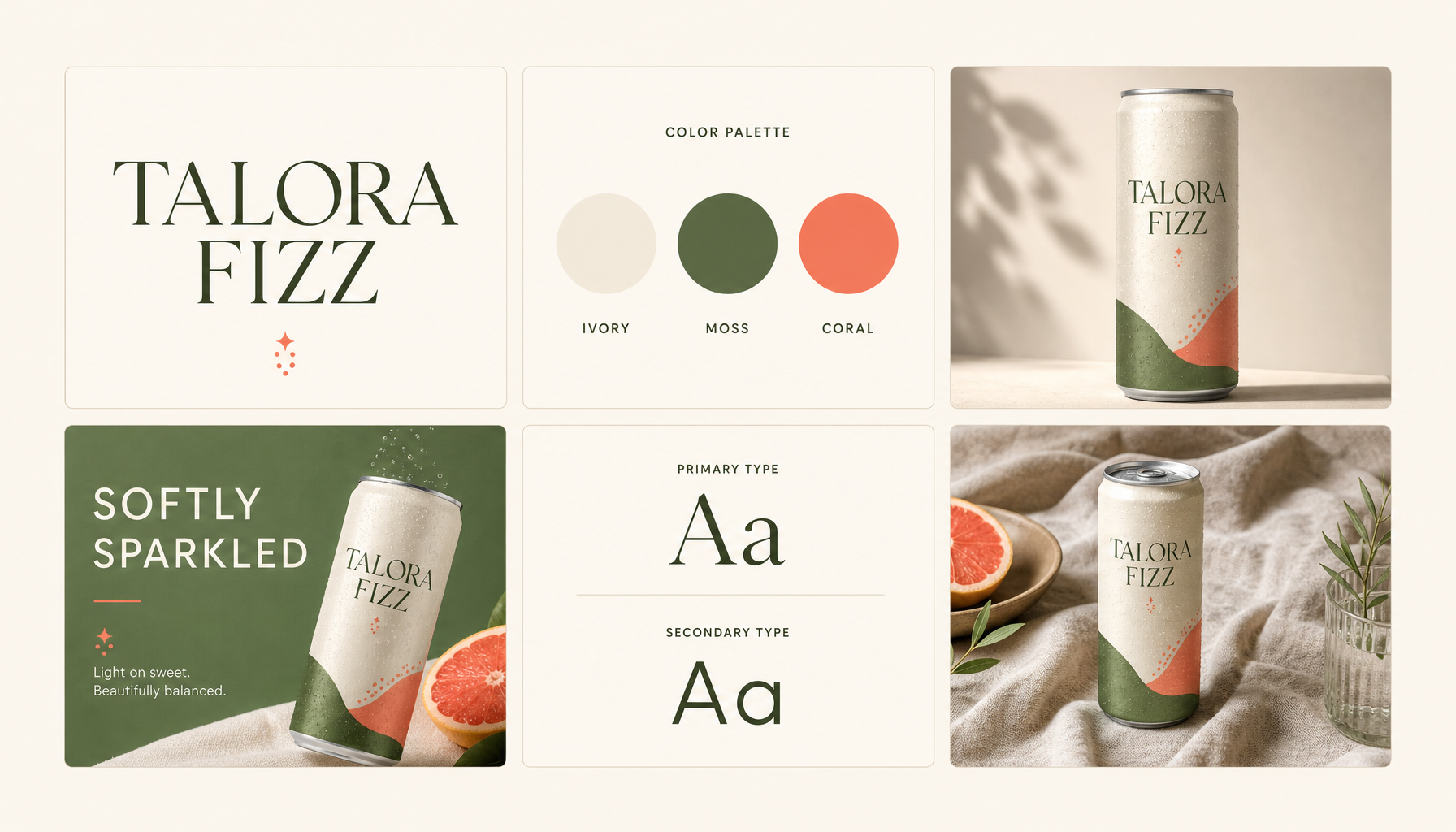
Generated in ImageLayer with General mode, GPT Image 2, X / Twitter (16:9), brand guidelines off.
16:9 brand kit preview board for fictional sparkling drink brand TALORA FIZZ. Show six clean tiles on a warm ivory canvas: wordmark tile with text exactly "TALORA FIZZ", color palette circles labeled "IVORY", "MOSS", "CORAL", can mockup with label exactly "TALORA FIZZ", social ad tile with headline exactly "SOFTLY SPARKLED", and lifestyle photo tile with a can on linen. Premium CPG identity system, editorial layout, soft shadows, modern serif plus clean sans typography, cohesive coral and moss palette. Keep text minimal and readable. No real logos, no watermark.Reusable template:
[ASPECT RATIO] brand kit preview board for fictional [CATEGORY] brand [BRAND NAME]. Show [NUMBER] clean tiles on a [BACKGROUND] canvas: logo tile with wordmark exactly "[BRAND NAME]", color palette circles labeled "[COLOR 1]", "[COLOR 2]", "[COLOR 3]", packaging or product mockup with label exactly "[BRAND NAME]", social ad tile with headline exactly "[CAMPAIGN LINE]", typography tile, and lifestyle photo tile showing [PRODUCT / USE CASE]. [BRAND PERSONALITY] identity system, editorial layout, soft shadows, [TYPE DIRECTION], cohesive [PALETTE] palette. No real logos, no extra words, no watermark.The Prompt Formula
For brand campaign assets, use this structure:
Format:
[aspect ratio, platform, crop, panel system]

Brand:
[fictional or real brand name, category, colors, tone]

Subject:
[person, product, packaging, UI, scene, or object]

Layout:
[where the subject, copy, badges, logo, and decorative system sit]

Exact text:
[every headline, slogan, badge, label, CTA, or feature chip in quotes]

Style:
[photography, illustration, typography, lighting, texture, material]

Constraints:
[no extra words, no fake logos, no watermark, preserve product, use only these colors]
That structure matters more than the length of the prompt. A short prompt with clear layout usually beats a long prompt full of vibes.
Illustrated Prompt Library
Below are more English examples you can adapt inside ImageLayer. Every prompt in this section has a result next to it. If you do not have an image yet, the prompt is not ready for a blog post.
1. Food Brand Poster
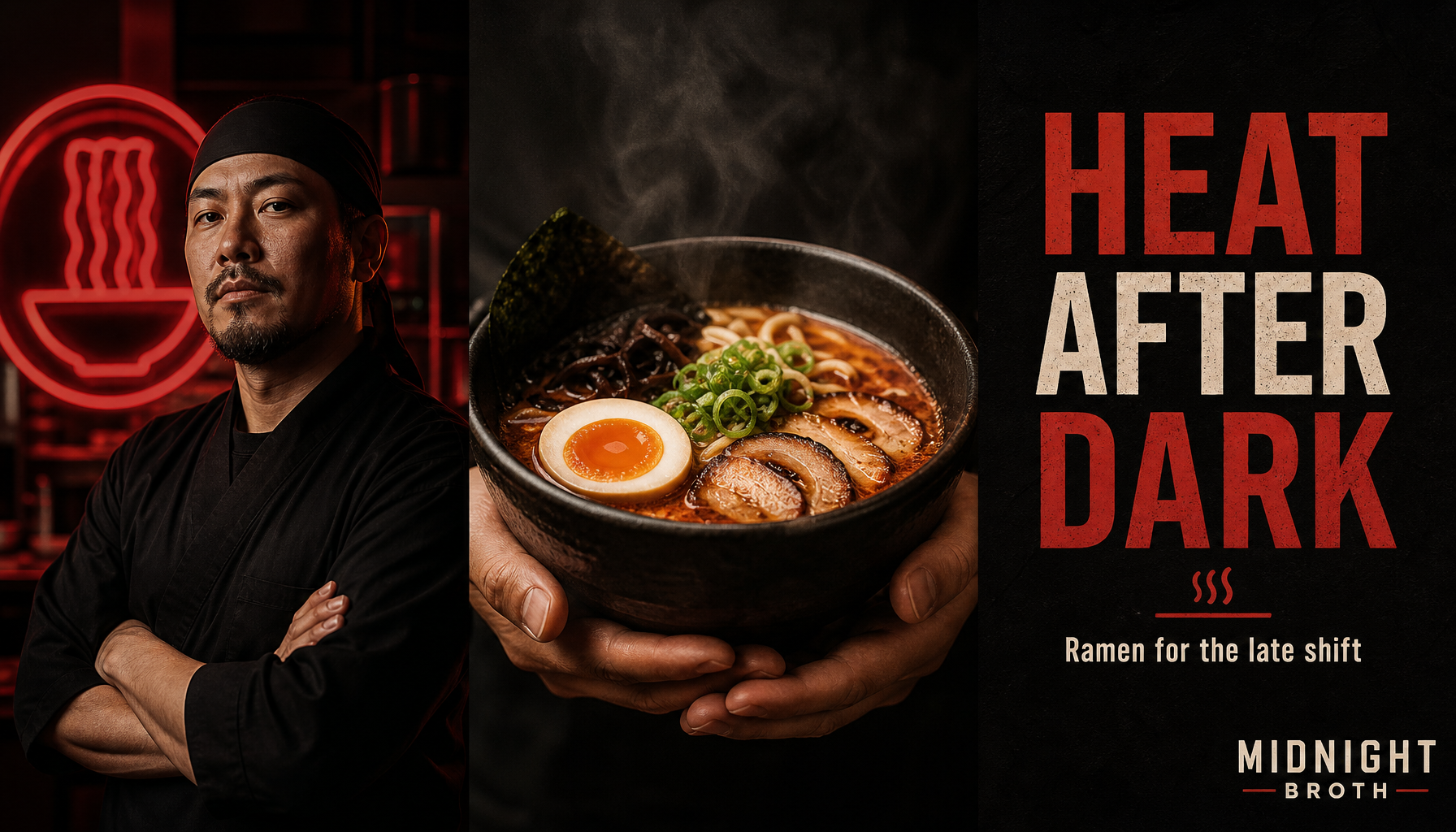
Generated in ImageLayer with General mode, GPT Image 2, X / Twitter (16:9), brand guidelines off.
16:9 premium advertising poster for fictional ramen brand MIDNIGHT BROTH. Three vertical panels: chef portrait under red neon, steaming ramen bowl held by two hands, matte black typography panel. Headline exactly "HEAT AFTER DARK". Slogan exactly "Ramen for the late shift". Small MIDNIGHT BROTH wordmark bottom-right. Palette: black, chili red, warm cream. Editorial restaurant campaign, photorealistic, no real logos, no extra words, no watermark.2. Product Packaging Mockup
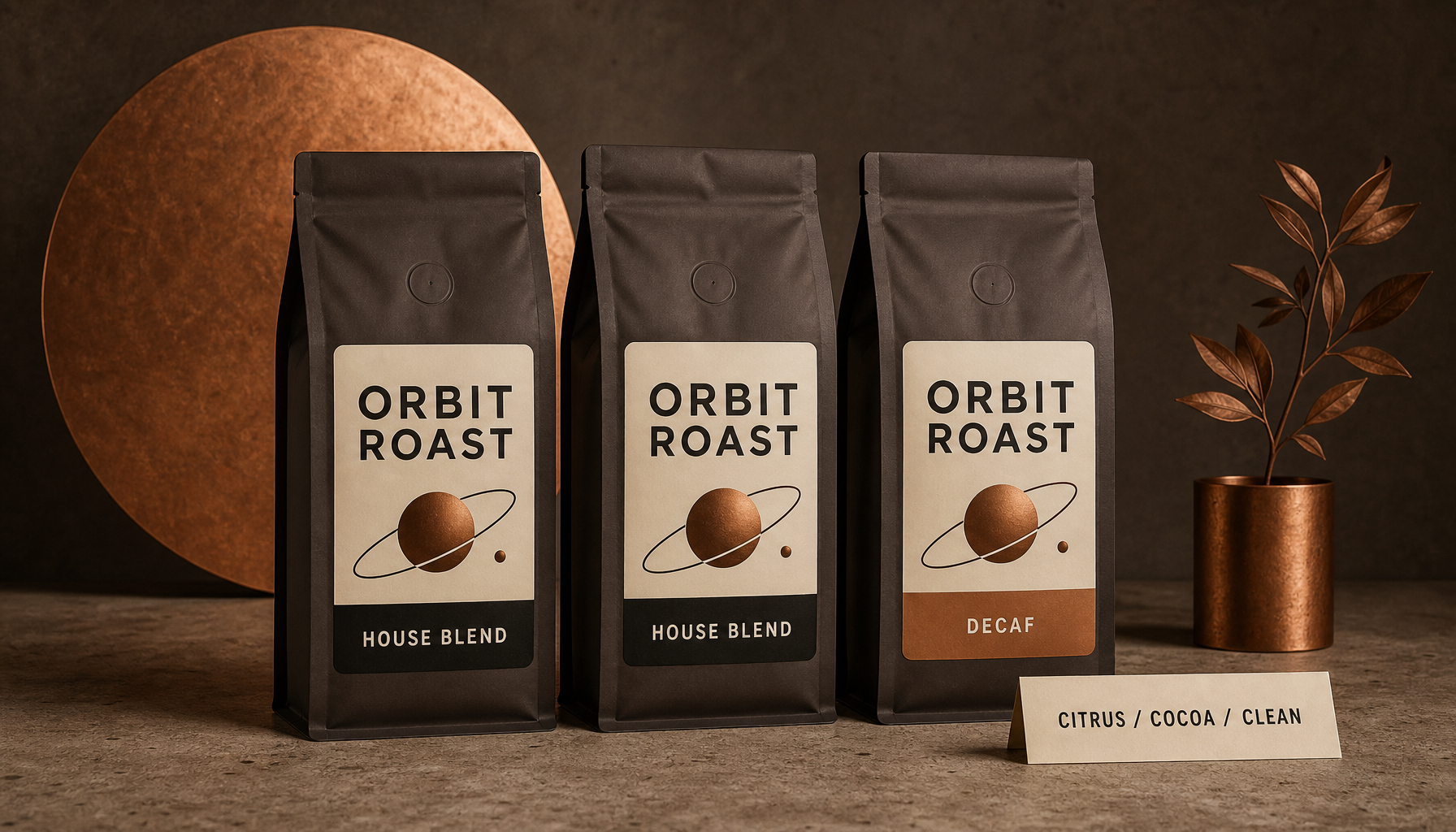
Generated in ImageLayer with General mode, GPT Image 2, X / Twitter (16:9), brand guidelines off.
16:9 packaging concept board for fictional coffee brand ORBIT ROAST. Show three matte coffee bags standing on warm concrete, labels read exactly "ORBIT ROAST", "HOUSE BLEND", and "DECAF". Add a small tasting card reading exactly "CITRUS / COCOA / CLEAN". Palette: espresso brown, cream, copper. Studio product photography, crisp label text, realistic paper texture, no extra claims, no real logos, no watermark.3. Skincare Social Ad
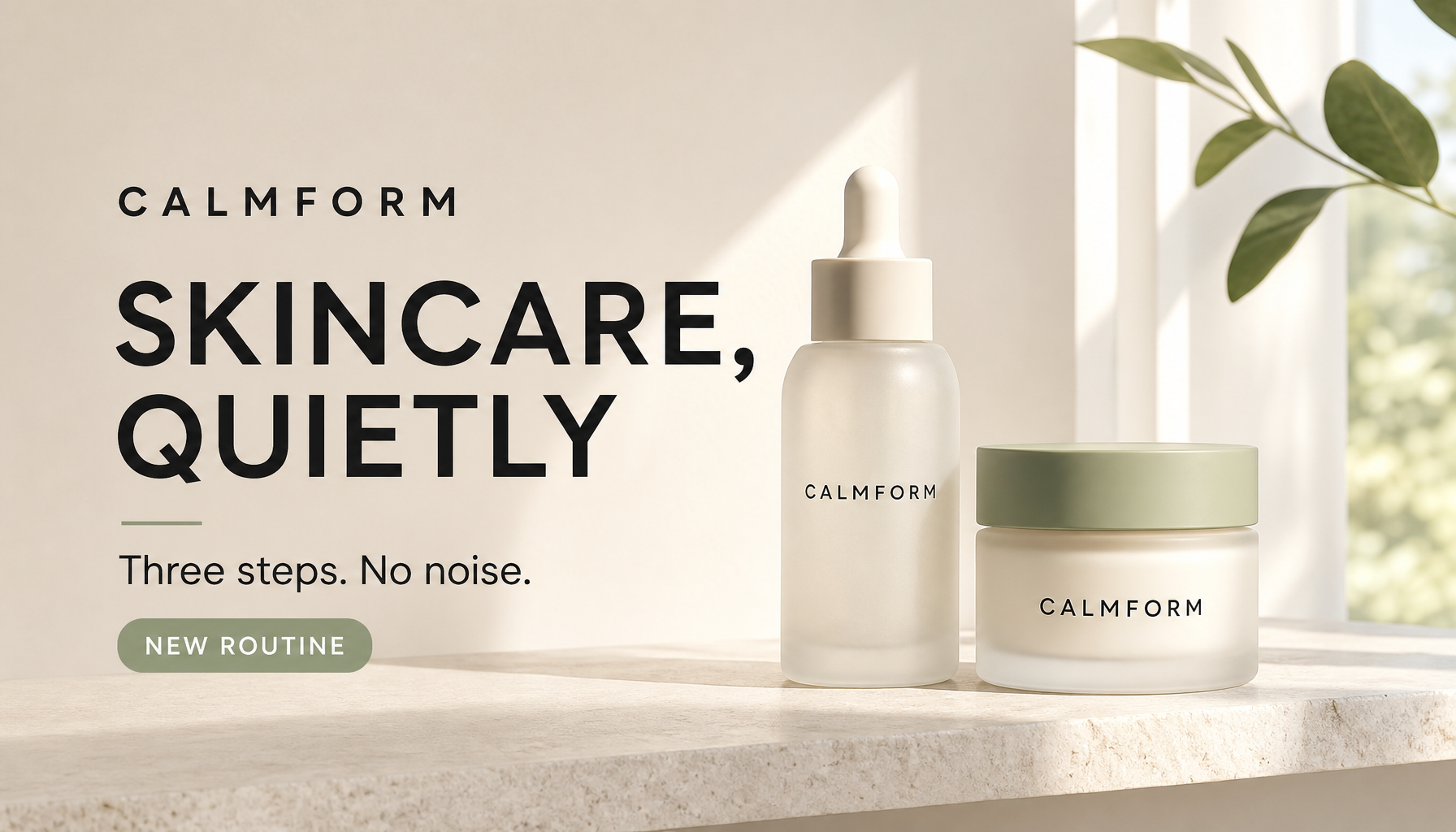
Generated in ImageLayer with General mode, GPT Image 2, X / Twitter (16:9), brand guidelines off.
16:9 premium paid social ad for fictional skincare brand CALMFORM. Frosted serum bottle and soft cream jar on pale stone shelf, morning window light, gentle shadow. Headline exactly "SKINCARE, QUIETLY". Supporting line exactly "Three steps. No noise." Badge exactly "NEW ROUTINE". Palette: warm white, sage, soft black. Minimal editorial beauty photography, clean sans typography, no extra claims, no extra words, no watermark.How to Choose the Right ImageLayer Setup
Use this as a quick routing rule:
- General: one-off campaign concept, creator trend adaptation, poster, brand board, experimental visual.
- Product Photo: source-product preservation, packaging mockup, product-on-white, lifestyle product ad.
- Promo / Special Offer: recurring sale graphics where the offer, code, and date change.
- Announcement: feature launches, funding news, milestones, and waitlist drops.
- Infographic: process cards, explainers, visual checklists, and educational assets.
- Platform Presets: use 16:9 for blog headers and X/Twitter, 4:5 for LinkedIn and Instagram feed, 9:16 for stories and vertical ads.
- Brand Guidelines: turn on once you have a real brand system to preserve. Keep it off while exploring fictional examples or new visual directions.
The Useful Constraint
The best prompts in this category are not the most imaginative. They are the most constrained.
Ask for fewer panels. Use fewer colors. Quote every important word. Tell the model where the logo goes. Say which real brands not to copy. Tell it not to add extra words.
That is how a viral prompt becomes a production workflow: the creative idea stays fun, but the output starts behaving like a brand asset.
Keep Exploring
- GPT Image 2 Playbook - The broader model strategy for ImageLayer workflows.
- Copy-Paste GPT Image 2 Prompts for Social Ads and Posters - More text-in-image prompt patterns.
- GPT Image 2 for Product Photos and Packaging Mockups - Product preservation and packaging prompt patterns.
- Content Type Templates - How to turn winning prompts into reusable fields.